

ASA2 1.33.0 is now available. This release surfaces Amazon’s planned PA API shutdown directly inside the plugin. It also adds one-click copy-to-clipboard for Product IDs on the product edit screen and in the products list.
What’s New in ASA2 1.33
- PA API Sunset Notice: A red deprecation banner on the Setup page names the May 15, 2026 shutdown date and links to the Creators API setup
- Product ID Copy UI: Dedicated Product ID box on the edit screen and clickable copy pills in the ID column of the products list
- Memory Limit Notice: Dismissible admin notice when the PHP memory limit is below the recommended 256 MB
- New Developer Hook:
asa2_product_edit_after_fieldsfor add-ons that inject panels below the core product fields - Bug Fixes: Three fixes including a PHP 8.0+ TypeError on custom products with non-numeric prices
PA API Deprecation Now Visible Inside the Plugin
Amazon plans to shut down the Product Advertising API on or around May 15, 2026. Many ASA2 sites still run on PA API credentials, and Amazon’s announcement only reaches users who actively follow its developer channels. Until now, ASA2’s Setup page treated the PA API and the Creators API as equal alternatives, with no signal that one of them was on the way out.
ASA2 1.33.0 changes this. A red DEPRECATED badge now appears next to the “Amazon Product Advertising API (PA API)” headline on Setup > With API. Below it, a notice names the API, flags it as deprecated, and surfaces the shutdown date directly:
The notice links straight to the Creators API setup screen, so the migration path is one click away. A second, smaller change pairs with this. The Creators API overview page (Setup > Creators API) now ends with a link to the full Creators API documentation. Together, these two changes make the migration path obvious from anywhere in the Setup area.
Nothing needs to be configured. The notice appears automatically on the Setup page whenever the PA API is the active API. For a complete walkthrough of the Creators API, see the Creators API documentation.

The deprecation notice on the Setup page links directly to the Creators API setup screen.
One-Click Copy for Product IDs
Building shortcodes that reference a specific product needs the numeric Product ID. It is used with the asin parameter, or with the universal {{ ProductId }} placeholder added in ASA2 1.32.0. Until now, the only way to grab the ID was to read it out of the product list or the URL on the edit screen. Both are slower than they should be.
ASA2 1.33.0 turns the Product ID into a copy-to-clipboard control in two places.
Product Edit Screen
Saved products now show a dedicated Product ID box with the value and a Copy button. The button briefly flips to “Copied!” as feedback, and a hint reads: “Use this ID e.g. as the asin parameter in shortcodes.” The box only renders for products that have already been saved at least once — the ID does not exist before the first save.
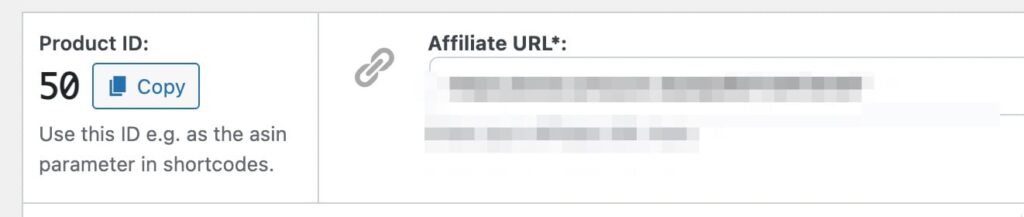
The Product ID box on the edit screen with one-click copy.
Products List
The “ID” column in the products list now renders each ID as a clickable pill. Clicking the number copies the value, and the label briefly turns into “Copied!” before reverting. This makes it possible to grab IDs in bulk without opening individual products.
The copy UI works for products of any type — Amazon, custom products, and any other shop products stored in ASA2. It pairs naturally with the universal {{ ProductId }} placeholder shipped in 1.32.0, which is especially relevant for custom products where there is no ASIN to fall back on.

Each ID in the products list is now a one-click copy pill.
Memory Limit Notice for Low-Memory Hosts
WordPress sites on shared hosting sometimes run with a PHP memory limit as low as 64 MB or 128 MB. ASA2 runs comfortably below 256 MB on most pages. Tight memory limits can still trigger out-of-memory errors during plugin activation, large imports, or cronjobs that touch many products at once. Until now, there was no warning before such an error — users only noticed when something broke.
ASA2 1.33.0 adds a dismissible admin notice on ASA2 pages and the WordPress dashboard whenever the active PHP memory_limit is below 256 MB. The notice names the recommended value and explains that lower limits can trigger silent failures on memory-heavy operations. It can be dismissed per user, so it does not nag administrators who deliberately run with a lower limit.

The most common way to raise the limit is through wp-config.php:
define('WP_MEMORY_LIMIT', '256M');Hosts that ignore this constant typically expose a php.ini setting in their control panel. The full list of recommendations is in the ASA2 system requirements documentation.
Bug Fixes and Polish
- PHP 8.0+ TypeError on non-numeric prices: Rendering a custom product whose price field contained a non-numeric value such as
--previously triggered a fatalTypeError. The price formatter now passes non-numeric input through unchanged instead of forwarding it tonumber_format(). (asa2-97) - WordPress 6.7 i18n notice silenced: The intermittent
_load_textdomain_just_in_timenotice introduced when WordPress 6.7 changed translation loading no longer fires from the API stats cleanup that runs on theplugins_loadedhook. (asa2-99) - “Dasboard” typo fixed: The long-standing typo in the Plugins-page action link is now spelled “Dashboard”. (asa2-98)
For Developers
A new action hook asa2_product_edit_after_fields fires on the product edit screen below the core product fields. Add-ons can use it to inject their own panels into the edit screen without touching ASA2 core. The hook receives the current product object as its argument:
add_action('asa2_product_edit_after_fields', function ($product) {
    // Render add-on panel below ASA2 core fields
});
This hook is the integration point that upcoming ASA2 add-ons rely on for their edit-screen UI.
Technical Requirements
Requirements are unchanged from 1.32.x:
- WordPress: 5.2 or higher
- PHP: 8.1 or higher
- PHP memory_limit: 256 MB recommended (now surfaced as an in-plugin notice)
Getting Started
- Update ASA2 through the WordPress dashboard or download version 1.33.0 from your account area
- If you still use the PA API, open Setup > Creators API and follow the migration path described in the Creators API documentation
- If the memory limit notice appears, raise
WP_MEMORY_LIMITto256Minwp-config.phpor contact your host
For questions or issues, visit the help page. Full documentation is available at docs.getasa2.com, and the complete history of releases is at the changelog.



0 Comments