


ASA2 1.32.0 is now available. This release prepares all managed templates for the new ASA2 Tracking add-on, introduces CSV export/import for products, adds the {{ ProductId }} placeholder for custom products, and includes a new Add-ons page plus fixes for API stats retention and keyword caching.
What’s New in ASA2 1.32
- Tracking Add-on Support: All managed templates updated with tracking-compatible data attributes
- ProductId Placeholder: Universal product identifier for all product types, including custom products
- Export / Import: CSV export and import for products — migrate between sites without database access
- API Stats Retention: Dedicated settings for API stats, decoupled from general log retention
- Add-ons Page: New admin page to discover and manage ASA2 add-on plugins
- Keywords Fixes: Three reliability improvements for keyword caching and preload
ASA2 Tracking Add-on Support
Until now, there was no way to see which products and affiliate links visitors click on in your ASA2 templates. ASA2 1.32.0 changes this by preparing all managed templates for the new ASA2 Tracking add-on.
ASA2 Tracking records which products, templates, and link elements (button, title, image) get the most clicks. Three tracking providers are supported: a self-hosted built-in dashboard, Matomo, and Google Analytics 4. The add-on is available as a free plugin from the product page.

All managed templates now include the required data-linktype attributes. No manual template changes are needed — tracking data is injected automatically at render time. Install the Tracking add-on, enable a provider, and click data starts flowing.
For a detailed overview of the Tracking add-on, see the Tracking documentation.
CSV Export / Import for Products
Migrating ASA2 products between WordPress installations previously required direct database access via phpMyAdmin or mysqldump. ASA2 1.32.0 adds a built-in export/import feature under Products > Export / Import.
Export
The export supports four combinable filters: shop, category, tag, and date range. This allows exporting all products at once or a specific subset — for example, only products from a particular shop added in the last month. Filter lists with more than 10 entries include a search field for quick lookup.
The CSV file uses semicolons as delimiters and includes a UTF-8 BOM for direct compatibility with Microsoft Excel.

Export products with filters by shop, category, tag, and date range.
Import
Upload a CSV file to import products into another ASA2 installation. Two shop handling modes are available: skip products whose shop does not exist on the target site (default), or auto-create missing shops during import. The auto-create option sets up the full shop structure including custom post type, taxonomy, and field mapping.
All taxonomy data (shops, categories, tags) is matched by name rather than database ID. This means exports work across different installations without manual ID mapping. After import, a summary shows the number of imported products, skipped entries, and any per-line warnings.
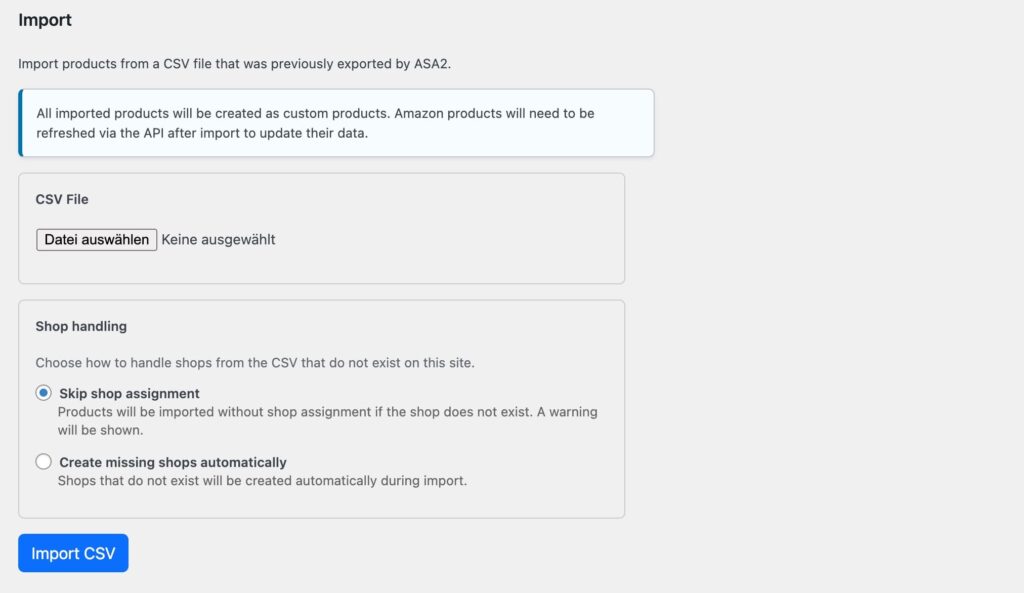
Import products from CSV with configurable shop handling.
For the full documentation, see the Export / Import documentation.
New ProductId Placeholder
Custom products from non-Amazon shops previously had no reliable unique identifier available in templates. The {{ ASIN }} placeholder is empty for these products, making it impossible to identify them in template logic or for tracking purposes.
ASA2 1.32.0 adds the {{ ProductId }} placeholder. It contains the WordPress post ID of the product entry and works for all product types — Amazon, custom shops, eBay, and any other shop product stored in ASA2.
The ASA2 Tracking add-on uses this placeholder to track clicks on non-Amazon products. Beyond tracking, {{ ProductId }} is useful in custom template conditionals whenever a universal product identifier is needed.
The placeholder is automatically available in all templates. No configuration required. See the ProductId placeholder documentation for details.
API Stats Retention Settings
API request statistics previously shared their retention settings with the general error log. The default limit of 500 entries was too low for sites with regular API traffic, causing stats data to disappear within days on active sites.
ASA2 1.32.0 gives API stats their own dedicated retention settings under Options > Logging > API stats:
- Time to keep: How long entries are retained. Options range from 1 week to 12 months. Default: 3 months.
- Max entries: Maximum number of stored entries. Options range from 5,000 to Unlimited. Default: 50,000.
Both limits are applied independently. The new defaults are a significant improvement over the previous shared 500-entry limit. For more details, see the API stats retention settings documentation.
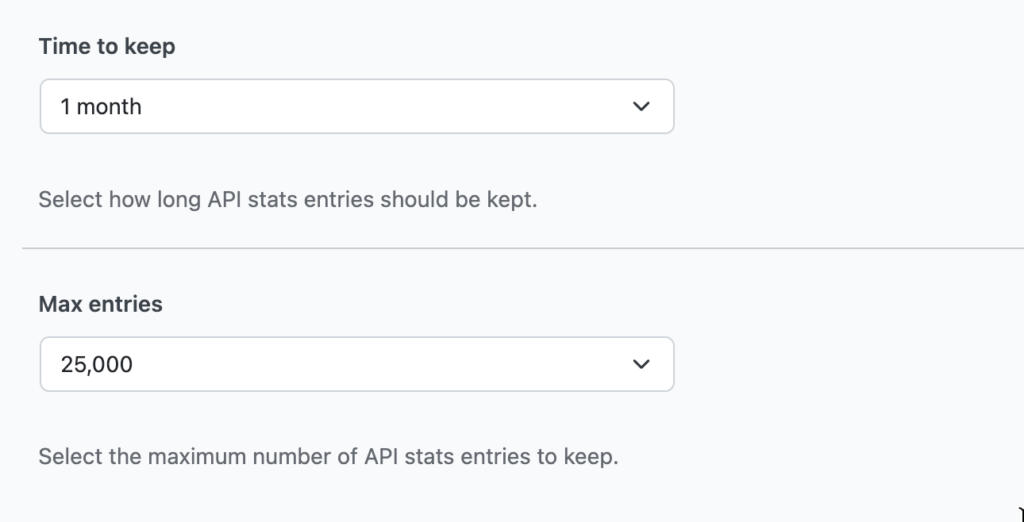
API stats now have dedicated retention settings, independent from general log settings.
New Add-ons Page
A new page under ASA2 > Add-ons lists all available ASA2 add-on plugins with their current status. It shows whether an add-on is installed, activated, or available for download. This makes it easier to discover and manage add-ons like ASA2 Tracking, ASA2 Advanced Log, and ASA2 DevTools from one place.
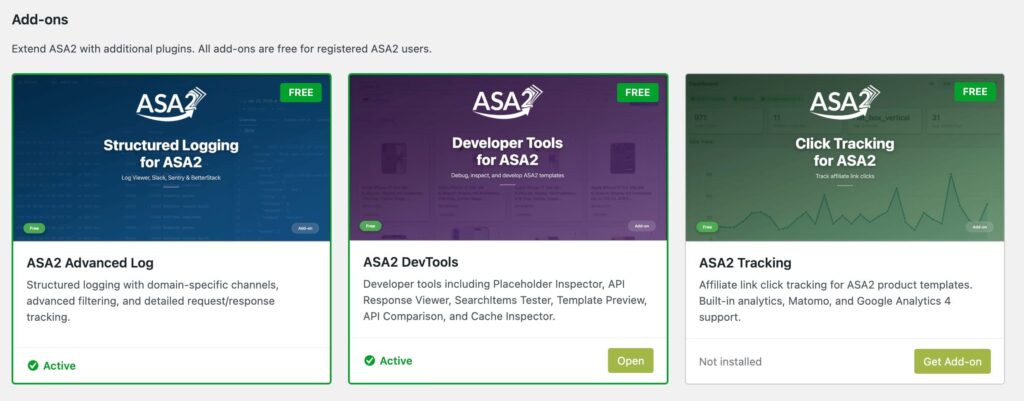
The Add-ons page provides an overview of all available ASA2 add-on plugins.
Bug Fixes and Improvements
Keywords Reliability Improvements
Three issues affecting keyword caching and the preload cronjob have been resolved:
- Stale cache after updates: The keywords cache was not cleared during plugin updates. If a previous ASA2 version cached an error response for a keyword query, that error persisted after updating to a version with the fix. The cache is now cleared on every plugin update.
- Preload race condition: The keywords preload cronjob briefly deleted the existing cache before writing the new result. During this gap, visitors could see uncached (slower) responses. The cronjob now writes the new cache atomically without deleting the old entry first.
- Preload retry loop: When the Amazon API returned a complete failure (null response), the preload marker was renewed instead of being allowed to expire. This caused the cronjob to retry the same failing request indefinitely. The marker is no longer renewed on null responses.
Technical Requirements
- PHP: 8.1 or higher
- WordPress: 5.9 or higher
- ASA2 Tracking add-on: Requires PHP 8.1+ and WordPress 5.9+
Getting Started
- Update ASA2 through the WordPress dashboard or download version 1.32.0 from your account area
- To use click tracking, install the free ASA2 Tracking add-on
- Review the new API stats retention settings under Options > Logging > API stats if needed
For questions or issues, visit the help page. Full documentation is available at docs.getasa2.com.



0 Comments