

ASA2 1.33.1 is now available. It closes a reflected cross-site scripting vulnerability on the ASA2 admin pages and rebuilds the Setup page around the Amazon Creators API. There are no new product features in this release, so the reason to install it is the security fix.
What’s New in ASA2 1.33.1
- Security Fix: A reflected XSS on the ASA2 admin pages is closed on three independent layers
- Framework Hardening: Output escaping in list tables and AJAX handlers, prepared statements for database access, direct file access guards
- Setup Page Reordered: Amazon Creators API is now the first tab and opens by default, Amazon PA API moved to second place with a “Deprecated” badge
- No More Dead-End Requests: Product lookups for a marketplace without Creators API credentials now name that marketplace instead of returning Amazon’s HTTP 403
- “Without API” as Its Own Tab: Redesigned into two sections with a screencast and a documentation link per topic
ASA2 1.33.1 Closes a Reflected XSS on the Admin Pages
ASA2 admin URLs carry three routing parameters: mod, controller and action. When routing failed, the framework built an error message containing those raw values. The admin error view then printed that message without escaping it. A logged-in user who opened a crafted link to an ASA2 admin page could therefore run JavaScript in their own browser session.
ASA2 1.33.1 closes this on three layers, so a mistake on any one of them is no longer enough:
- Input: The router strips everything outside letters, digits, hyphen and underscore from the three parameters before they reach any other code
- Throw site: The framework escapes every value it puts into an exception message
- Output: The ASA2 error view escapes everything it prints
The honest scope: exploiting this needed a logged-in user with access to the ASA2 admin pages to open a prepared link. Anonymous visitors could not reach it, and it did not expose stored data on its own. That makes it a fix to apply promptly rather than an emergency.
Hardening in the Same Release
Three further passes over the shared admin framework landed alongside the fix. Admin list tables, help pointers and metabox AJAX handlers now escape dynamic output before writing it into HTML attributes and inline JavaScript. Database access in the object layer, the plugin logger and the taxonomy proxy uses prepared statements instead of interpolated values. Every framework PHP file now carries a direct file access guard, so requesting its URL directly no longer executes it. None of these were known to be exploitable in ASA2. They remove the class of problem rather than one instance of it.
The Setup Page Now Reflects the Retired PA API
Amazon retired the Product Advertising API 5.0. Until this release, the ASA2 Setup page still opened on the PA API tab and presented the Creators API as the newer alternative. That is the wrong way round. Three changes correct it.
Amazon Creators API is now the first tab, and the Setup page opens on it. Amazon PA API moved to second position and carries an orange Deprecated badge. Without API became a top-level tab instead of a sub-tab hidden inside the PA API page. Anyone who already runs Creators API credentials for all their marketplaces will notice nothing beyond the new tab order.

The reordered Setup tabs. The page now opens on the Creators API by default.
The full tab structure is described on the Setup page documentation.
Product Lookups No Longer Run Into a Dead End
This is the part that changes daily work. If a marketplace had no Creators API credentials, ASA2 sent the product lookup to the retired PA API anyway. The request could only ever fail, and what came back was Amazon’s own HTTP 403 error:
Product Advertising API is deprecated. Please migrate to Creators API.That string tells you nothing about which of your marketplaces is affected or where to fix it. ASA2 1.33.1 detects the missing credentials before any request goes out and names the marketplace instead:
A link to the Creators API setup sits below the message. A second variant covers credentials that exist but are switched off, asking you to enable that marketplace rather than to create credentials. The messages appear wherever ASA2 requests product data: in the Product Picker, on the product edit screen, and in the logs.
The same reasoning applies when no Amazon API is configured at all. Searching in the Product Picker used to return a bare “No results”, which reads as “Amazon has nothing for this term” instead of “your credentials are missing”. Searches and lookups now report the missing setup the same way a failed request does, which matters most on a fresh installation.
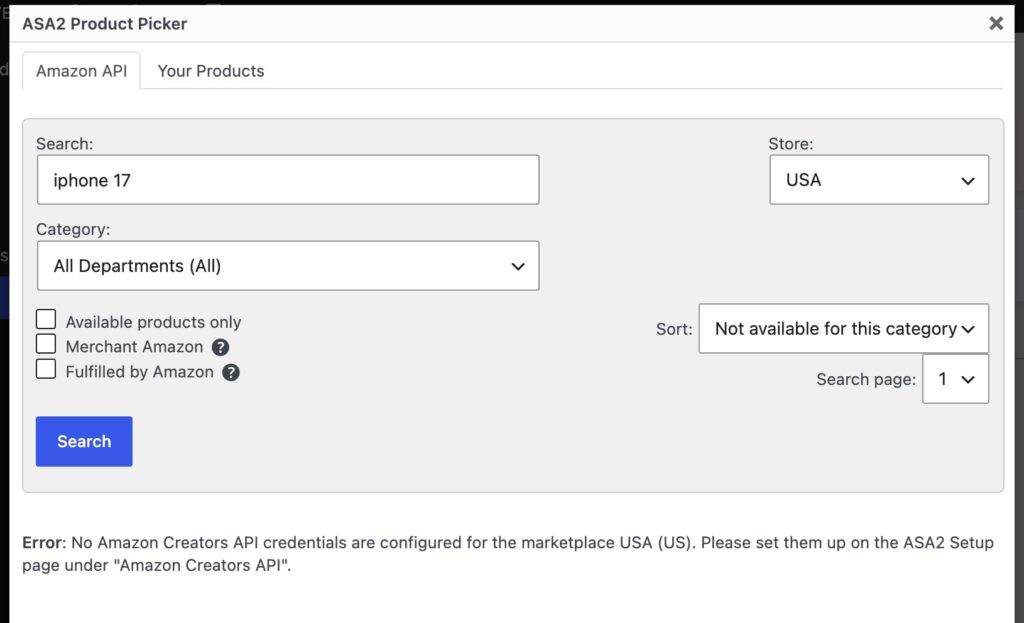
The Product Picker now names the marketplace that needs credentials.
Your PA API credentials stay stored and the tab stays available, so you can still review your old configuration. They no longer serve any purpose for product data. The Creators API documentation describes how ASA2 routes requests. Adding credentials per marketplace is covered under setting up Creators API credentials.
“Without API” Moved Out of the Deprecated Tab
Working with ASA2 without any Amazon API connection is a legitimate setup, and its instructions used to live inside the PA API page. With that page now marked deprecated, they would have been easy to overlook. In 1.33.1, “Without API” is a Setup tab of its own. It splits into two sections, and each topic there pairs a screencast with the matching documentation page.
- Amazon products without API: Create Amazon products manually with your affiliate link. ASA2 starts updating them automatically as soon as Creators API credentials exist. See create Amazon products without an API connection.
- Other shops and data feeds: Create a shop and add products by hand, fill a shop from an external CSV data feed, or use an Awin.com data feed.
The Creators API page gained a collapsible hint below its introduction titled “No API access yet? ASA2 works without it”, which expands into a short explanation and a button to the new tab. It is collapsed by default and stays out of the way for everyone who has credentials.
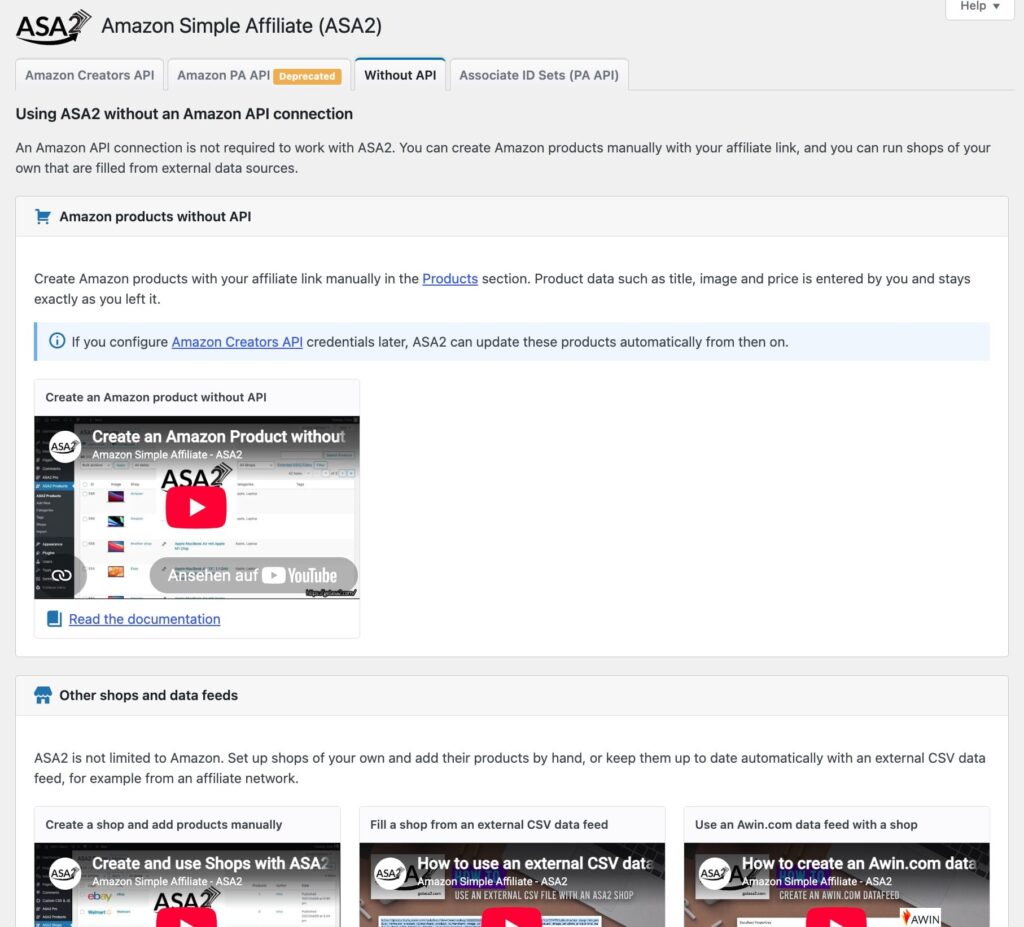
Each topic on the new tab pairs a screencast with the matching documentation page.
Bug Fixes
- Untranslatable premium badge: The “This is a premium feature” badge on the Setup page was not marked as translatable and always appeared in English. It now goes through the translation files.
- Opaque HTTP 403 on missing credentials: Covered above. Product lookups for a marketplace without Creators API credentials now abort with an actionable message. (asa2-100)
Technical Requirements
Requirements are unchanged from 1.33.0:
- WordPress: 6.0 or higher, tested up to 7.0.2
- PHP: 8.1 or higher
- Migration: None. No database changes and no configuration changes are required
Getting Started
- Update ASA2 through the WordPress dashboard or download version 1.33.1 from your account area
- Open ASA2 > Setup. It now lands on Amazon Creators API
- Check that every Amazon marketplace you use has credentials and that they are enabled. Marketplaces without credentials will report themselves the next time a product lookup runs
For questions or issues, visit the help page. Full documentation is available at docs.getasa2.com, and the complete history of releases is at the changelog.

0 Comments