

ASA2 1.30.0 is now available. This release focuses on product database hygiene: invalid products are now detected automatically, and deleted products can be removed from collections without manual effort. License error messages have also been reworked to give you actionable information instead of generic errors.
What’s New in ASA2 1.30
- Invalid Product Detection: Products with permanently invalid ASINs are marked automatically
- Status Filter: Filter invalid products and delete them with the standard bulk action
- Configurable Retry Limits: Control how many refresh attempts before an invalid product is excluded
- Collection Cleanup: Deleted products can be removed from collections automatically (new option)
- License Messages: Specific error messages replace generic license errors
- ASA2 Advanced Log: New free add-on plugin for structured logging with BetterStack, Sentry, and Slack integration
- Bug Fixes: Usage Analysis now detects Gutenberg block embeds correctly
Invalid Product Detection
Over time, product databases accumulate entries for ASINs that no longer exist on Amazon. Until now, these products silently failed during API refresh without any visible indication. ASA2 1.30 changes this with automatic invalid product detection.
When the cronjob or a manual refresh encounters a permanently invalid ASIN, ASA2 now marks the product with a distinct “Invalid Product” status. This status is different from temporary API errors — it indicates that Amazon has confirmed the product no longer exists.
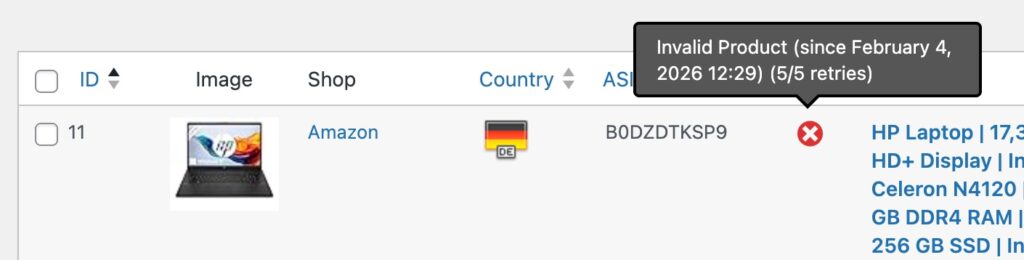
Invalid products are clearly marked in the product list with a red status indicator.
How Detection Works
ASA2 distinguishes between temporary API failures and permanent invalidity. A temporary error (such as a rate limit or network issue) keeps the product in its normal state. A permanent response from Amazon (ASIN not found) triggers the invalid product marker.
Each invalid product tracks when it was first detected as invalid and how many refresh attempts have been made. This information is visible in the product tooltip.
Filtering and Deleting Invalid Products
The product list now includes an “Invalid Product” option in the status filter dropdown. This lets you quickly see all products that Amazon has flagged as no longer available.

Filter your product list to show only invalid products.
Configurable Retry Counter
Not every “invalid” response means a product is gone forever. Amazon’s API can occasionally return incorrect results. The retry counter addresses this by giving each product multiple chances before permanent exclusion.
Navigate to Options > Products > Invalid Products to configure the maximum number of refresh retries. The default is 5 attempts. The product tooltip shows the current retry count (e.g., “3/5 retries”), so you can see where each product stands. See the Options documentation for all available settings.

Configure how many refresh attempts are allowed before a product is permanently excluded.
API Quota Savings
Invalid products are automatically excluded from the cronjob refresh cycle once they exceed the retry limit. This prevents wasted API requests on products that no longer exist, preserving your API quota for active products.
For a complete guide on filtering, bulk actions, recovery, and cronjob interaction, see the Invalid Products documentation.
Automatic Collection Cleanup
Collections can now be kept in sync with your product database automatically. A new option in Options > Products > Misc enables automatic removal of products from collections when they are deleted from the product database.
Previously, deleting a product left orphaned entries in any collection that referenced it. These had to be cleaned up manually. With this option enabled, collection entries are removed as part of the deletion process.
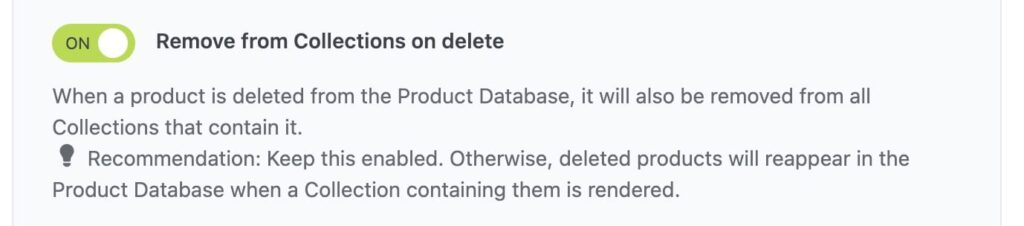
Enable automatic cleanup of collection entries when products are deleted.
Improvements and Bug Fixes
Specific License Error Messages
License-related error messages have been rewritten. Instead of a generic “License error” notification, ASA2 now tells you what went wrong: decryption failure, expired license, disabled license, inactive status, or a connection error. Each message includes guidance on what to do next.
Usage Analysis Fixes
- Gutenberg Block Detection: Usage Analysis now correctly identifies products embedded via the ASA2 Gutenberg block. Previously, only shortcode-based embeds were detected.
- Collection Result Count: The Collections tab in Usage Analysis now displays the result count badge, matching the behavior of the other tabs.
New: ASA2 Advanced Log Plugin
ASA2 1.30 includes a new structured logging system that captures diagnostic information across all major features: Cronjobs, API requests, cache operations, product imports, shortcode rendering, and more. This replaces the built-in Log module with a modern, domain-specific architecture.

To access and manage these logs, the new ASA2 Advanced Log plugin (version 1.0.0) is now available as a free add-on. It provides:
- Log Viewer: Browsable log viewer in the WordPress admin
- BetterStack Integration: Send logs to BetterStack (Logtail) for cloud-based log management
- Sentry Integration: Error tracking and monitoring
- Slack Integration: Real-time log notifications
- Configurable Log Levels: Control verbosity per handler
The plugin requires a free license key, available from your account area. A dedicated blog post with setup instructions and configuration details will follow.
Technical Requirements
- PHP: 8.1 or higher (unchanged from 1.29.0)
- WordPress: 5.2 or higher
- Tested up to: WordPress 6.9.1
This update is fully backward compatible. No configuration changes are required after updating. The invalid product detection activates automatically during the next cronjob cycle. The collection cleanup option is off by default and can be enabled when ready.
Getting Started
- Update ASA2 through the WordPress dashboard or download the latest version from your account area
- Check Options > Products > Invalid Products to review the retry counter default (5 attempts)
- Enable Options > Products > Misc > Remove from collections on delete if you want automatic cleanup
- After the next cronjob cycle, use the “Invalid Product” filter to review any detected invalid products
For questions or issues, visit the help page. Full documentation is available at docs.getasa2.com A complete list of all changes is in the changelog.


0 Comments