


Tomorrow marks the beginning of Amazon’s Prime Deal Days, one of the most anticipated shopping events of the year. As an ASA2 user, you have a powerful advantage: the ability to showcase Amazon’s special deal pricing directly in your product displays. This guide explores how to maximize your affiliate earnings during this high-traffic event using ASA2’s deal badge features.
Understanding Amazon Deal Badges
Amazon uses visual badges to identify special promotional pricing during events like Prime Deal Days, Lightning Deals, and exclusive Prime offers. These badges serve as powerful conversion triggers, creating urgency and highlighting exceptional value to shoppers.
Since version 1.27.0, ASA2 automatically captures and displays these deal badges through the Amazon Product Advertising API (PA API). When Amazon designates a product with special offer pricing, ASA2 receives this information and makes it available through the {{ OfferDealBadge }} placeholder.
How Deal Badges Work
The PA API provides deal badge information through the OffersV2 response structure. ASA2 processes this data and presents it in a ready-to-display format. Common badge types include:
- Prime Day Deal: Exclusive pricing for Prime members during Prime Day events
- Lightning Deal: Limited-time offers with countdown timers
- Deal of the Day: Featured daily promotions
- Limited Time Deal: Time-sensitive discounts
When a deal’s end time is not available from Amazon, ASA2 normalizes the display to show “Ends soon” to maintain a sense of urgency without displaying incomplete information.
The OfferDealBadge Placeholder
The {{ OfferDealBadge }} placeholder is your primary tool for displaying Amazon’s promotional badges. This placeholder contains the marketing text exactly as provided by Amazon, ensuring compliance with program requirements. (Full documentation)
Basic Implementation
For custom templates, integrating deal badges requires minimal code:
{% if OfferDealBadge %}
  <div class="deal-badge">{{ OfferDealBadge }}</div>
{% endif %}
This conditional check ensures the badge only appears when Amazon provides deal information. The badge text is dynamic and changes based on the specific promotion type.
Styling Deal Badges
While the text content comes from Amazon, you control the visual presentation. Effective badge styling should:
- Create visual prominence without overwhelming the design
- Use colors that signal special offers (typically red, orange, or Amazon’s deal colors)
- Ensure mobile responsiveness for smaller screens
- Position near pricing information for maximum impact
Example CSS for deal badge styling:
.deal-badge {
  background-color: #FF6B35;
  color: white;
  padding: 4px 12px;
  border-radius: 4px;
  font-weight: 600;
  font-size: 14px;
  display: inline-block;
  margin-bottom: 8px;
}
Nova25 Template: Deal-Ready Out of the Box
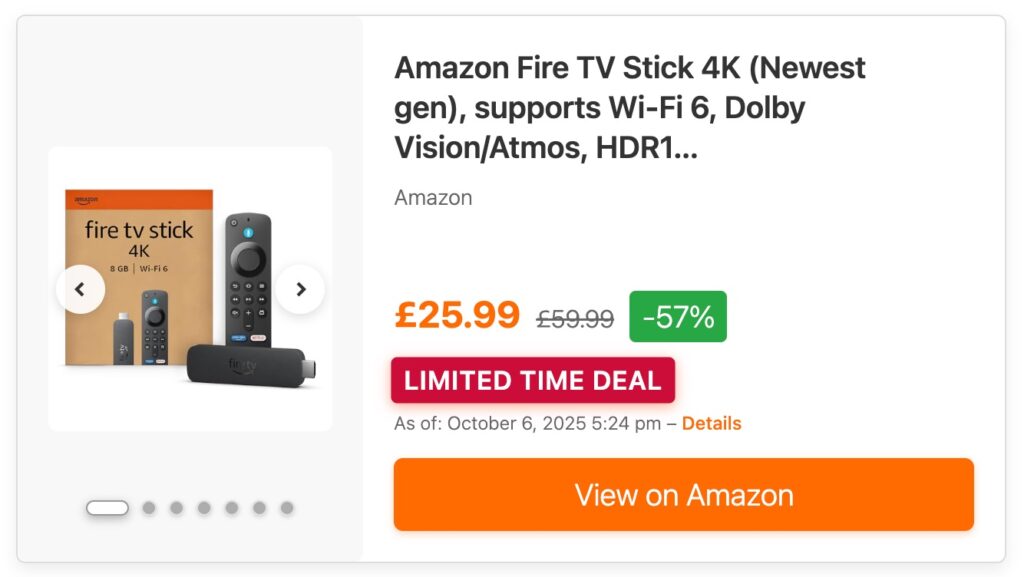
The Nova25 template, introduced in ASA2 1.28.0, provides built-in support for both Amazon deal badges and custom Product Badges. This modern template is specifically designed for promotional events like Prime Deal Days. (View demo)
Nova25 Deal Badge Features
Nova25 handles deal displays with sophisticated visual hierarchy:
- Automatic Badge Positioning: Deal badges appear prominently near product pricing
- Color Coordination: Customizable
deal_badge_coloroption for brand alignment - Badge Stacking: Supports both Amazon deal badges and custom Product Badges simultaneously
- Mobile Optimization: Responsive badge sizing and positioning for all screen sizes
Configuring Nova25 for Prime Deal Days
To optimize Nova25 for the Prime Deal Days event:
- Navigate to ASA2 → Templates
- Select Nova25 from managed templates
- Configure the
deal_badge_coloroption (suggested: #FF6B35 or #D42C00) - Ensure
show_priceis enabled to display special pricing - Set
show_price_disclaimerto “yes” for transparency

Using Nova25 with Shortcodes
Deploy Nova25 on Prime Deal Days landing pages with optimized settings:
[asa2 tpl="Nova25" deal_badge_color="#FF6B35"]B0094J2BZ0[/asa2]
For collections of deal products:
[asa2_smart_collection
  tpl="Nova25"
  limit="12"
  orderby="main_price"
  deal_badge_color="#D42C00"
  cat_slug="prime-deal-days"]
Enhanced Templates with Deal Support
Beyond Nova25, several ASA2 managed templates include OfferDealBadge support. The Robust template, for example, received deal badge integration in version 1.27.0.
Robust Template Implementation
The Robust template displays deal badges with its characteristic clean design:
[asa2 tpl="Robust"]B0094J2BZ0[/asa2]
Robust automatically positions deal badges above the price display, creating a clear visual flow from badge to pricing to call-to-action button.
Strategic Product Selection for Prime Deal Days
Maximizing affiliate revenue during Prime Deal Days requires strategic product curation. ASA2’s smart collections enable dynamic deal discovery and display.
Creating Deal-Focused Collections
Build collections that automatically highlight deals:
[asa2_smart_collection
  tpl="Nova25"
  limit="20"
  orderby="main_price"
  order="ASC"
  cat_slug="electronics"]
This approach surfaces products by price, often correlating with promotional discounts. Combine with product categories relevant to Prime Deal Days focuses like electronics, home goods, or fashion.
Manual Deal Curation
For maximum control, manually select high-value deals:
- Monitor Amazon’s Prime Deal Days offerings in your niche
- Add prominent deals to ASA2 using the Product Picker
- Organize in collections by category or discount depth
- Create dedicated landing pages for major deal categories
Custom Product Badges for Deal Promotion
ASA2 1.28.0‘s Product Badges feature complements Amazon’s deal badges by enabling custom promotional labels. Use these to highlight editorial picks or special categories within Prime Deal Days. (Full documentation)

Creating Deal-Specific Badges
Navigate to ASA2 → Products → Badges to create custom deal indicators:
- “Editor’s Choice” – Highlight your personally selected best deals
- “Top Deal” – Mark exceptional discounts in your content
- “Last Chance” – Create urgency for ending promotions
- “Best Value” – Identify price-to-quality standouts
Example badge configuration:
- Display Name: Editor’s Choice
- Internal Name: editors_choice
- Background Color: #FFD700 (gold)
- Text Color: #000000 (black)
- Icon: fa-star (FontAwesome)
Combining Amazon and Custom Badges
Nova25 and other advanced templates support displaying both Amazon deal badges and custom Product Badges simultaneously:
[asa2 tpl="Nova25" badge="editors_choice"]B0094J2BZ0[/asa2]
This displays Amazon’s Prime Deal Days badge (if present) alongside your custom “Editor’s Choice” badge, creating layered promotional signals that drive conversions.
Deal Badge Updates and Data Freshness
Amazon deal information is time-sensitive. Understanding ASA2’s update mechanisms ensures accurate deal display during fast-moving promotional events.
Automatic Updates via Cronjob
Configure ASA2’s product refresh cronjob for frequent updates during Prime Deal Days. The recommended approach is using the bash script wrapper (full documentation):
bash script.sh Asa2_Module_Repo_Cron_Refresh --limit=20 --lifetime=3600This updates up to 20 products per execution, refreshing those not updated within the last hour. For Prime Deal Days, consider reducing the lifetime to 1800 (30 minutes) for more responsive updates:
bash script.sh Asa2_Module_Repo_Cron_Refresh --limit=20 --lifetime=1800 --verboseThe --verbose option provides detailed information about which products were updated. Use ASA2’s cronjob calculator to determine optimal settings for your product catalog size.
Manual Refresh for Critical Products
For featured products requiring immediate updates:
- Navigate to ASA2 → Products
- Locate the product in your list
- Click Refresh to fetch current data from Amazon
- Verify deal badge appears if the offer is active

Cache Considerations
If you use WordPress caching plugins or server-level caching, configure appropriate expiration times for Prime Deal Days:
- Page Cache: Reduce to 1-2 hours maximum
- Object Cache: Configure ASA2’s cache lifetime in Options → Advanced
- CDN Cache: Set short TTL for product pages during the event
Content Strategies for Prime Deal Days
Effective deal promotion extends beyond technical implementation. Strategic content creation amplifies your affiliate performance.
Deal Roundup Posts
Create curated lists of the best Prime Deal Days offers in your niche:
- Category-Specific Roundups: “Best Prime Deal Days Electronics” or “Top Home & Kitchen Deals”
- Price-Point Collections: “Prime Deals Under $50” or “Luxury Items with Deep Discounts”
- Trending Products: “Most Popular Prime Deal Days Products in 2025”
Use smart collections to populate these posts dynamically, reducing manual maintenance as deals change.
Comparison Content
Leverage deal pricing to create compelling comparisons:
<h2>Prime Deal Days vs Regular Pricing</h2>
[asa2 tpl="Nova25"]B0094J2BZ0[/asa2]
<p>Regular price: $299 | Prime Deal Days price: $199 | Savings: $100 (33%)</p>
Highlight savings percentages to emphasize value and encourage immediate purchase decisions.
Time-Sensitive Alerts
Create urgency with time-limited content:
- Email newsletters featuring expiring deals
- Social media posts with deal badges prominently displayed
- Banner sections on high-traffic pages highlighting limited-time offers
Mobile Optimization for Deal Traffic
Prime Deal Days generates significant mobile traffic. Nova25’s mobile-first responsive design ensures your deal displays are optimized for maximum conversions across all devices.
Nova25 Mobile Features
Nova25’s responsive design excels on mobile devices:
- Touch-friendly button sizing
- Readable text at small screen sizes
- Optimized image loading for mobile bandwidth
- Streamlined layouts that prioritize key information
- Automatic responsive adjustments without additional configuration

Performance Optimization During High Traffic
Prime Deal Days brings increased visitor traffic. Optimize ASA2 for peak performance during the event.
Caching Strategy
Balance freshness with performance:
- ASA2 Template Cache: Enable template caching in Options → Templates
- Browser Caching: Configure appropriate cache headers for product images
- Database Query Optimization: Use smart collection filters to reduce query complexity
Image Optimization
Amazon product images can be bandwidth-intensive. Optimize delivery:
- Use appropriate image size options:
image_size="medium"for list displays - Enable ASA2’s local images feature for frequently displayed products
- Leverage lazy loading for collections with many products
API Request Management
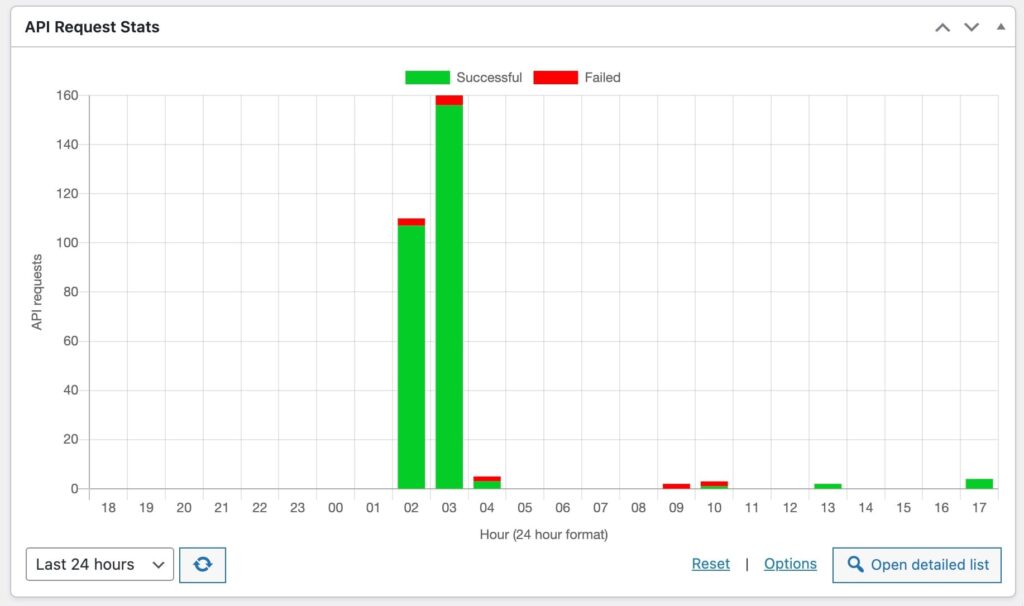
Monitor PA API request limits during high-update frequency periods:
- Configure request throttling in Options → Amazon PA API
- Use the API stats recording feature to track usage
- Prioritize updates for high-traffic products
Compliance and Best Practices
Displaying Amazon deal information requires adherence to Amazon Associates Program policies.
Price and Availability Disclaimers
ASA2 automatically includes required disclaimers when configured properly:
- Enable
show_price_disclaimerin template options - Display last update timestamps near pricing information
- Include appropriate language about price and availability changes
Nova25 includes these elements by default when show_price_disclaimer="yes" is set.
Deal Badge Accuracy
Ensure deal badges reflect current Amazon information:
- Maintain regular product updates during the event
- Remove or update content when deals expire
- Monitor affiliate dashboard for policy compliance alerts
Disclosure Requirements
Clearly disclose affiliate relationships:
- Include affiliate disclaimers on deal pages
- Use ASA2’s disclaimer options in template configurations
- Ensure disclosures are visible on all device sizes
Analytics and Performance Tracking
Measure your Prime Deal Days success to inform future strategies.
Key Metrics to Monitor
- Click-Through Rate: Track clicks on deal products versus regular products
- Conversion Rate: Monitor purchases from deal traffic
- Revenue Per Click: Calculate earnings efficiency for deal content
- Product Performance: Identify top-performing deal categories
ASA2 Tracking Implementation
Use ASA2’s tracking ID options for granular analytics:
[asa2_smart_collection
  tpl="Nova25"
  tracking_id="yourid-prime-deals-20"
  cat_slug="prime-deals"]
This enables isolation of Prime Deal Days performance in your Amazon Associates reporting.
Post-Event Optimization
After Prime Deal Days concludes, optimize your setup for regular operations.
Content Cleanup
- Update or remove deal-specific content with expired offers
- Archive high-performing deal posts for future event reference
- Reset product update frequencies to standard intervals
- Restore normal cache expiration times
Performance Analysis
Review event performance to improve future promotional strategies:
- Identify top-performing product categories
- Analyze which templates generated highest conversions
- Evaluate badge effectiveness (Amazon vs custom)
- Document successful content formats for replication
Technical Requirements
To utilize ASA2’s deal badge features effectively:
- ASA2 Version: 1.27.0 or higher for OfferDealBadge support
- ASA2 Version: 1.28.0 or higher for Nova25 template and Product Badges
- WordPress: 5.2 or higher
- PHP: 7.4 or higher (8.4 recommended)
- Amazon PA API: Valid credentials with OffersV2 access
Troubleshooting Common Issues
Deal Badges Not Appearing
If {{ OfferDealBadge }} remains empty:
- Verify product has active Amazon deal (check directly on Amazon)
- Confirm PA API credentials have OffersV2 resource access
- Refresh product data to fetch latest information
- Check template includes conditional logic for badge display
Nova25 Deal Badge Styling Issues
If deal badges appear but with incorrect styling:
- Verify
deal_badge_coloroption is set in template configuration - Check for CSS conflicts with theme styles using browser developer tools
- Ensure custom CSS isn’t overriding Nova25’s badge styles
- Test on different devices to confirm responsive behavior
Performance Degradation
If site performance suffers during high traffic:
- Enable ASA2 template caching immediately
- Reduce product update frequency if server load is high
- Implement page caching for deal landing pages
- Consider CDN usage for product images
Advanced Implementation Examples
Deal Comparison Tables
Create side-by-side deal comparisons using Nova25:
<div class="deal-comparison">
  <div class="deal-column">
    [asa2 tpl="Nova25" deal_badge_color="#FF6B35"]B0094J2BZ0[/asa2]
  </div>
  <div class="deal-column">
    [asa2 tpl="Nova25" deal_badge_color="#FF6B35"]B0095K3CZ1[/asa2]
  </div>
</div>
Featured Deal Hero Section
Highlight a top Prime Deal Days offer prominently:
<div class="hero-deal">
  <h2>Featured Prime Deal Days Offer</h2>
  [asa2 tpl="Nova25"
       badge="top_deal"
       deal_badge_color="#D42C00"
       max_width="600"
       align="center"]B0094J2BZ0[/asa2]
</div>
Dynamic Deal Countdown
While ASA2 doesn’t provide countdown timers directly, combine with custom JavaScript:
<div class="deal-with-countdown">
  [asa2 tpl="Nova25"]B0094J2BZ0[/asa2]
  <div class="countdown" data-end-time="2025-10-09T23:59:59">
    <!-- Countdown timer JavaScript -->
  </div>
</div>
Future-Proofing Your Deal Strategy
ASA2’s deal badge infrastructure supports all Amazon promotional events, not just Prime Deal Days. Use these same techniques for:
- Black Friday / Cyber Monday: Year’s largest shopping events
- Prime Day (July): Summer’s major Prime member sale
- Lightning Deals: Daily time-limited promotions
- Holiday Sales: Seasonal promotional events
By mastering these tools for Prime Deal Days, you establish a repeatable framework for maximizing affiliate revenue during all Amazon promotional periods.
Getting Started Checklist
Prepare for Prime Deal Days with this implementation checklist:
- Update ASA2: Ensure version 1.28.0 or higher is installed
- Configure Nova25: Set deal_badge_color and other Prime Deal Days optimizations
- Create Custom Badges: Set up “Editor’s Choice” or similar promotional badges
- Curate Products: Add anticipated deals to ASA2 product library
- Build Collections: Create category-based smart collections for deal displays
- Optimize Cronjobs: Configure frequent updates during the event period
- Prepare Content: Draft deal roundup posts and comparison articles
- Test Mobile: Verify responsive behavior on all device sizes
- Configure Caching: Balance performance with data freshness
- Set Up Tracking: Implement unique tracking IDs for event analytics
Conclusion
Amazon’s Prime Deal Days represent a significant opportunity for affiliate marketers. ASA2’s {{ OfferDealBadge }} placeholder, combined with the modern Nova25 template and flexible Product Badges system, provides comprehensive tools for capitalizing on this high-traffic event.
By implementing deal badges strategically, optimizing template configurations, and maintaining fresh product data, you create compelling, conversion-focused product displays that leverage the urgency and value signals Amazon provides during promotional periods.
The techniques outlined in this guide apply not only to Prime Deal Days but to all Amazon promotional events throughout the year. Master these implementations now to establish a robust, scalable affiliate marketing system that performs consistently across all shopping seasons.
Ready to maximize your Prime Deal Days performance? Start implementing these strategies today and watch your affiliate conversions soar.
Need the latest version of ASA2? Download version 1.28.0 through your WordPress admin dashboard or get the installable ZIP file from your account area.
0 Comments