


ASA2 Version 1.29.0 is now available and brings comprehensive support for Amazon’s Creators API – the successor to the Product Advertising API 5.0. The highlight: a flexible Multi-Marketplace architecture that lets you configure Creators API credentials separately for each Amazon marketplace.
What’s New in ASA2 1.29.0
The core of this update is the new Amazon Creators API integration with per-marketplace credential management. This means:
- Per-Marketplace Configuration: Configure Creators API credentials individually for each Amazon marketplace (DE, US, UK, FR, etc.)
- Automatic API Routing: ASA2 automatically selects the right API based on marketplace and credential availability
- Parallel Operation: Run Creators API for some marketplaces while keeping PA API for others
- Seamless Fallback: If no Creators API credentials exist for a marketplace, ASA2 uses PA API automatically
Also check out the new Amazon Creators API section in the online documentation.
Why Multi-Marketplace Matters
Unlike the global PA API credentials you’re used to, Amazon’s Creators API credentials are tied to specific marketplaces. If you promote products from multiple Amazon stores (e.g., amazon.de, amazon.com, amazon.co.uk), you need separate Creators API credentials for each.
ASA2 1.29.0 handles this complexity for you:
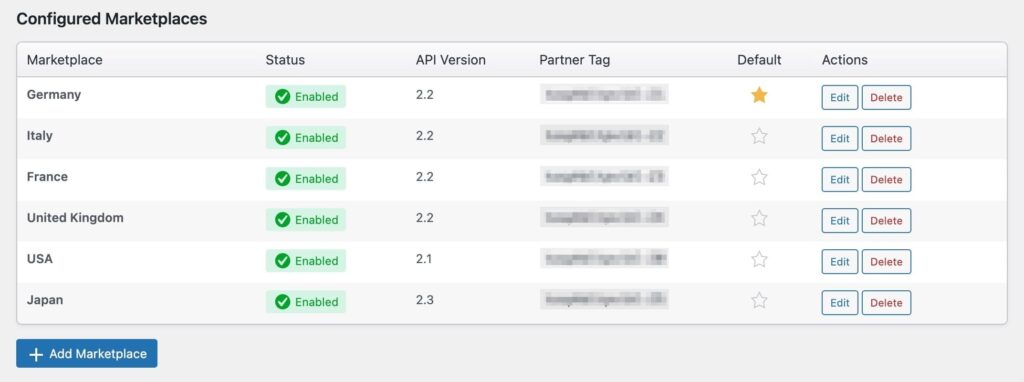
The new Creators API setup in ASA2 – add credentials for each marketplace you use. Enable or disable individual marketplaces as needed.
Each marketplace can be configured and enabled independently. When you request a product, ASA2 checks if Creators API credentials are available for that marketplace. If yes, it uses Creators API. If not, it falls back to PA API.
What You Need to Do
Step 1: Update to ASA2 1.29.0
Update your plugin through the WordPress dashboard or download the latest version from your account.
Step 2: Create Creators API Credentials
For each marketplace you want to use with Creators API, you need to create new credentials in your Amazon Associates account. Your existing PA API credentials (Access Key and Secret Key) do not work with the Creators API.
Find the PartnerNet URL for your country in our documentation, then check out the Amazon Documentation to learn how to create your Creators API credentials.
Step 3: Configure in ASA2
Go to ASA2 → Setup → Creators API and add your credentials for each marketplace:
- Click “Add Marketplace”
- Select the marketplace (e.g., Germany, United States)
- Enter your Credential ID and Credential Secret
- Save and enable the marketplace
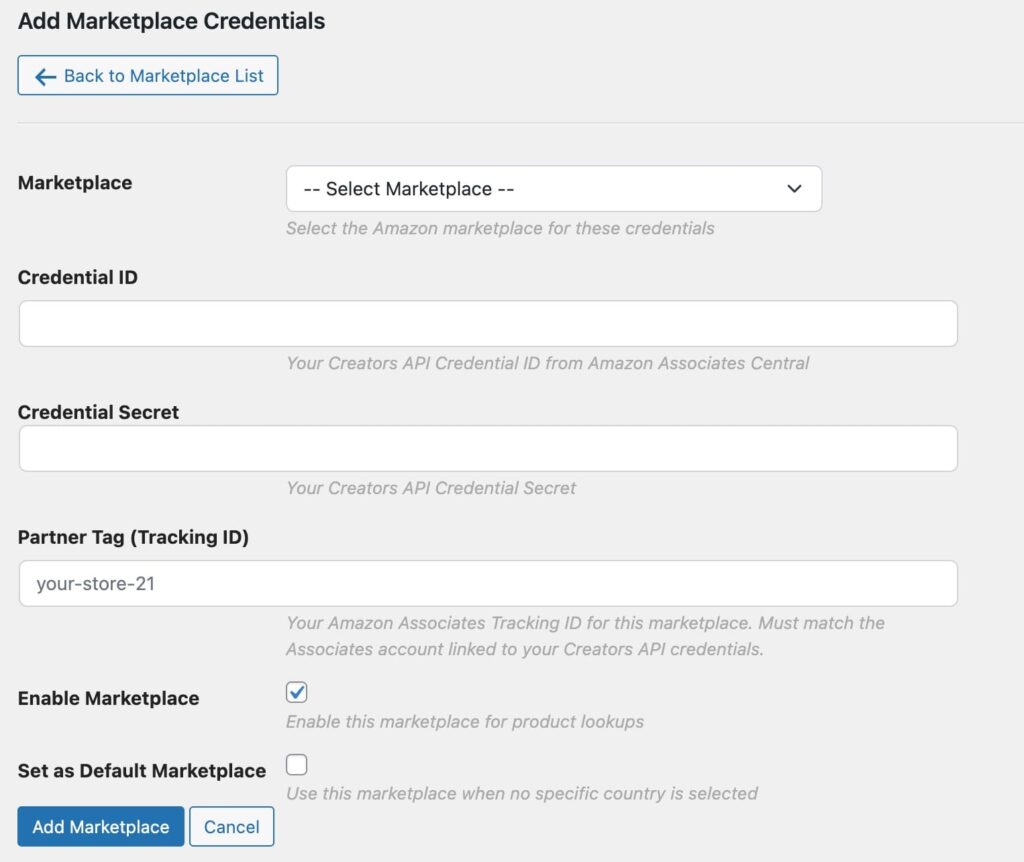
Adding Creators API credentials for a specific marketplace – simple form with Credential ID, Credential Secret, and enable toggle.
How API Selection Works
ASA2 automatically selects the appropriate API for each request:
| Scenario | API Used |
|---|---|
| Creators API credentials configured and enabled for marketplace | Creators API |
| Creators API credentials disabled for marketplace | PA API 5.0 |
| No Creators API credentials for marketplace | PA API 5.0 |
| PHP version below 8.1 | PA API 5.0 (Creators API requires PHP 8.1+) |
This means you can migrate marketplace by marketplace at your own pace. No need to switch everything at once.
Technical Requirements
- For Creators API: PHP 8.1 or higher (requirement from Amazon’s SDK)
- For PA API 5.0: PHP 7.4 or higher (unchanged)
Important note on PHP versions: While ASA2 technically supports PHP 7.4+ for PA API and PHP 8.1+ for Creators API, we strongly recommend running PHP 8.3 or higher. This aligns with the official WordPress requirements, which recommend PHP 8.3 as the minimum version.
- PHP 7.4: End of Life since November 2022 – strongly discouraged, no security updates
- PHP 8.0: End of Life since November 2023 – no longer recommended
- PHP 8.1: End of Life since December 2024 – works with Creators API but no longer receives security updates
- PHP 8.2+: Recommended minimum for production sites
- PHP 8.3+: Recommended by WordPress, best choice for security and performance
If your server still runs an older PHP version, please contact your hosting provider about upgrading. Most modern hosting providers offer PHP 8.3 as the default option.
PA API Status Display
When Creators API is active for at least one marketplace, the PA API setup page shows a notice:

The PA API setup clearly indicates when Creators API is active for some marketplaces.
This helps you understand which API is being used and prevents confusion when troubleshooting.
Frequently Asked Questions
Do I have to migrate to Creators API now?
No. PA API 5.0 continues to work. However, Amazon retired the “Offers V1” endpoint on January 31, 2026. For full offer data, you should migrate to Creators API. You can do this marketplace by marketplace.
Can I use both APIs at the same time?
Yes. This is the main benefit of the Multi-Marketplace architecture. Configure Creators API for some marketplaces while using PA API for others. ASA2 handles the routing automatically.
My server runs an older PHP version – what now?
While PA API 5.0 technically still works with PHP 7.4+, we strongly recommend upgrading to PHP 8.3 or higher. PHP 7.4, 8.0, and even 8.1 are End of Life and no longer receive security updates. For Creators API, PHP 8.1+ is required, but PHP 8.2+ is recommended. Contact your hosting provider about upgrading – most providers offer PHP 8.3 as the default option today.
What about my existing product data?
Nothing changes for your existing products. They continue to work as before. When products are refreshed or new products are added, ASA2 uses the appropriate API based on your configuration.
Why separate credentials per marketplace?
This is how Amazon designed the Creators API. Unlike PA API where one set of global credentials works for all marketplaces, Creators API credentials are tied to specific Amazon Associates programs. ASA2’s Multi-Marketplace architecture makes managing this straightforward.
What’s Next
We recommend:
- Update to ASA2 1.29.0 if you haven’t already
- Create Creators API credentials for your primary marketplace
- Test the integration by adding a new product
- Expand gradually to other marketplaces as needed
The transition can happen at your own pace. There’s no rush, but we recommend starting with your most important marketplace to get familiar with the new system.
For questions or issues, please use our help page.


0 Comments